Windows Installation Guide
WarForge may trigger browser and Windows warnings — here's exactly how to handle them.
Installing using Microsoft Edge
Step 1
Edge blocks download
→
1 Click "···" menu
Step 2
2 Click "Keep"
Step 3
Edge asks to confirm
→
3 Click ▾ arrow next to Delete
→
3 Click "Keep anyway"
Edge has extra download protection with 3 steps before you can even run the installer.
Installing using Chrome & other browsers
Download
File downloads normally
→
Download complete ✓
Chrome, Firefox, Brave, and most browsers download without any warnings or extra steps.
After download is complete — Windows SmartScreen
Screen 1
SmartScreen: "Windows protected your PC"
→
Click "More info"
Screen 2
Shows app name + "Unknown publisher"
→
Click "Run anyway"
→
Installed ✓
This SmartScreen step applies to all browsers — it appears when you run the .exe file, not during download.
Why does this happen?
WarForge is a new application without a Microsoft code-signing certificate yet. Windows SmartScreen warns about any .exe from an "Unknown publisher" — this is standard for all new software and does not mean the file is unsafe. The warning goes away automatically as the app builds download reputation over time.
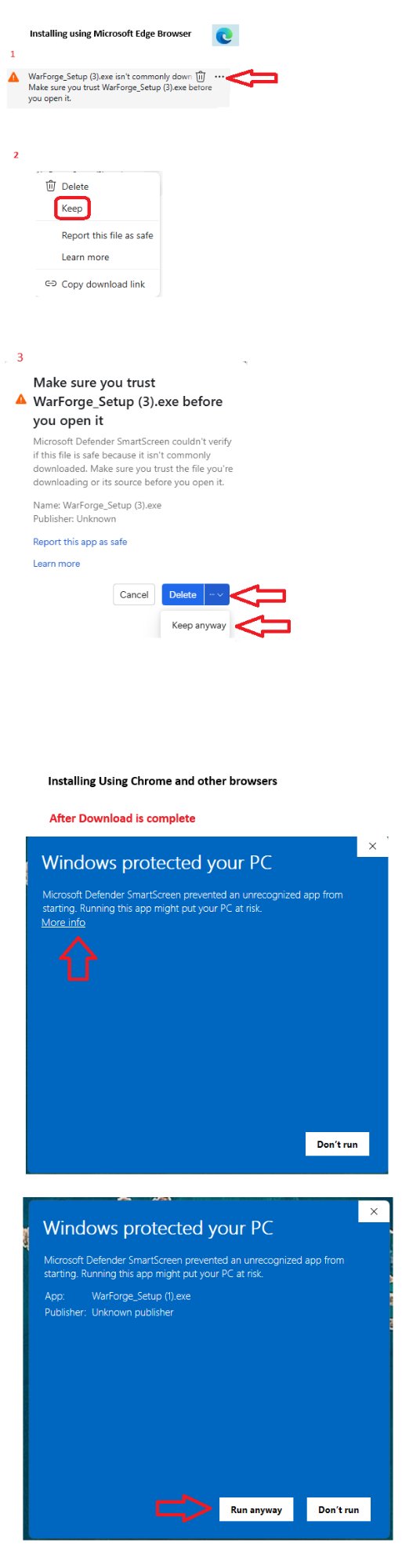
Annotated screenshot reference — click to view full size